Original Message:
Sent: 05-07-2026 00:37
From: Ronny Schneider
Subject: Sde.Cloud Subtraction/Addition - and still unanswered HoopsPlanView.PointCloudPick
Hi Bryce,
thank you, very cool, that did the trick, this is as fast as in 3D view and taught me some usage for the aperture. I had seen "picker" and "aperture" in Trimble.Sde but hadn't found out how to utilize it.
A bit of a spelling error there in GraphicsEngineHoops.PickAperature, need to be careful if you don't have IntelliSense. InputSettings.PickAperture is correct. Or is this to distinguish between them?
What do entityLocation and fastMode really do in SelectPointCloudPosition? I couldn't distinguish a difference in the result. I'm using False for both and couldn't see a difference in speed or result if set to True.
I stand a little bit corrected about the speed difference when filtering from 270 million or 100000 points. But it's marginal.
Sometimes the filtering from 100000 points is twice as fast
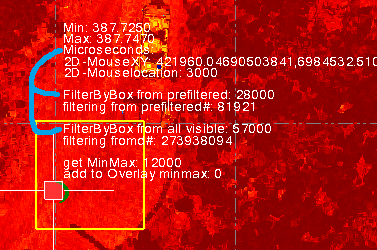
sometimes even slower
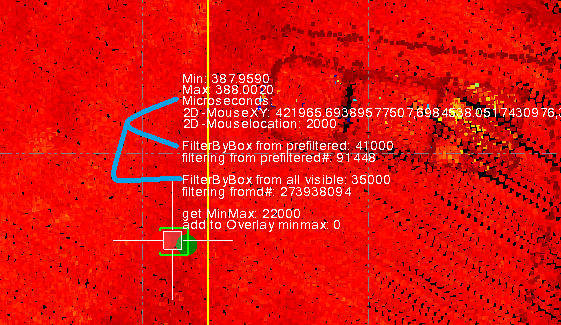
On average maybe 20-30 % faster.
Creating that prefiltered subset cloud is as fast as filtering once from 270 million points, about 0.05 sec.
The yellow outline is a BoxFiltered area out of the 270 million. This is only updated if the green outline, right under the cursor, is crossing it, re-centering the yellow box over the cursor.
The green outline is another BoxFilter, either from 270 million points or what is in the yellow outline.
I'm still undecided if it's worthwhile to maintain the prefilter code. The speed gain seems too marginal and fluctuating.
------------------------------
Ronny Schneider
------------------------------
Original Message:
Sent: 05-04-2026 13:05
From: Bryce Haire
Subject: Sde.Cloud Subtraction/Addition - and still unanswered HoopsPlanView.PointCloudPick
Hey Ronny,
The behavior of the FindElevations shouldn't depend on total points but simply the cloud itself. The cloud is independent of the view, so a filtered point cloud should perform better.
One thing I can say is the SDE SDK is not really intended to be utilized in a "live action" (ie cursor) based framework, and is indented to be utilized in a "processing" framework. Anytime you move from 280M points to 94k points, there will be a performance hit.
There are instances where that is performance hit is reduced (including in PointCloudPick).
PointCloudPick ultimately results in the following code.
public override Point3D PointCloudPick(int pixelX, int pixelY, bool fastMode = true) { int aperatureSize = InputSettings.PickAperture; Point3D localPoint = ViewCache.SdeViewCache.PickingManager.SelectPointCloudPosition(new GraphicsEngineHoops.PickAperature(this, new Point(pixelX - aperatureSize, pixelY - aperatureSize), new Point(pixelX + aperatureSize, pixelY + aperatureSize)), false, fastMode); if (!localPoint.IsUndefined) { localPoint.X += ViewCache.Transform.TranslateX; localPoint.Y += ViewCache.Transform.TranslateY; localPoint.Z += ViewCache.Transform.TranslateZ; } return localPoint; }
The key here is the SelectPointCloudPosition.
Maybe you simply utilize that for what you are trying to do. This call should be compatible with the PlanView if utilized there. You should already have access to the ViewCache via GetActiveViewCache from ExtractionTools.
------------------------------
Bryce Haire
Original Message:
Sent: 05-03-2026 23:25
From: Ronny Schneider
Subject: Sde.Cloud Subtraction/Addition - and still unanswered HoopsPlanView.PointCloudPick
Yes, I had seen the CachePaused property and briefly experimented with it.
Unfortunately, you can't have the program sit in a while loop to wait for the cache to turn un-paused. As long as the python script runs the cache stays paused.
My current solution is as follows:
- if the viewfilter change event is triggered I try to create the SDE cloud, that may even succeed
- in case the cache was paused I set a global variable to indicate the cache was still paused
- the subsequent cloud extraction that is triggered by mouse clicks or mouse movement of a CoordinateEdit checks the global cache indicator and re-triggers the retrieval of the visible SDE cloud, if necessary
Regards the issues with the 2D PointCloudPick. You say, "Because multiple points can exist at the same (X, Y) coordinate with different Z values, the system cannot automatically determine which point you intended to select.".
That could easily be the case in a 3D view as well. View vector is going through two cloud portions, i.e. two sides of a wall/house/beam etc. The 3D view would also have to determine to which one it needs to snap. Probably to the point closest to the camera.
Anyway, I found a short way by utilizing Sde.Cloud.FindElevations. Is minimum 10-20 times slower than PointCloudPick in a 3DView.
                closesttocursor = self.coordCtl1.WindowToWorldSpaceTransform(Point3D(e.MousePosition.X, e.MousePosition.Y, 0), False, e.MessagingView.PageToWorld)
                closesttocursor.Z = self.visiblesdecloud.FindElevations([Point3DExtensions.ToSde(closesttocursor)], 0.1, SdeElevationType.Maximum, None, IntPtr(0))[0].Z
With 280 million points on the screen, it takes about 0.025 seconds.
Weirdly this is dependent on how many points are turned on to be visible on the screen and not on how many points the SDE cloud contains that is used with FindElevations.
I've seen the same behavior before with FilterByBox. This is unintuitive. I don't understand why the filter speed is dependent on the number of visible points instead the number contained in the cloud portion it is used with. Maybe you can shed some light on why this is the case.
- 280 million points visible on screen
- cloud portion that is used with FindElevations has 280 million points
- ~0.025 sec
- 280 million points visible on screen
- cloud portion that is used with FindElevations has ~94000 points
- ~0.025 sec
- 2.7 million points visible on screen
- cloud portion that is used with FindElevations has 2.7 million points
- ~0.011 sec
- 2.7 million points visible on screen
- cloud portion that is used with FindElevations has ~94000 points
- ~0.011 sec
------------------------------
Ronny Schneider
Original Message:
Sent: 04-30-2026 10:22
From: Bryce Haire
Subject: Sde.Cloud Subtraction/Addition - and still unanswered HoopsPlanView.PointCloudPick
I would query the viewCache Paused value (from ExtractionTools.GetActiveViewCache())).
If Paused, it is still rebuilding/loading. When unpaused, it should be loaded.
Maybe you can add a poller or wait while it is paused, and then run when paused is set to false.
------------------------------
Bryce Haire
Original Message:
Sent: 04-29-2026 19:31
From: Ronny Schneider
Subject: Sde.Cloud Subtraction/Addition - and still unanswered HoopsPlanView.PointCloudPick
I gave it a quick test and GetVisiblePoints is exactly what I need, reducing a page of code to one single line, bloody hell.
And it retrieves for the currently active view and its view filter. Don't have to worry about that one either.
tt = ExtractionTools().GetVisiblePoints(self.currentProject)
This code is triggered by a view filter change event, BUT the view might not have loaded all the data yet and the above code returns Null.
Is there an indicator/event that a view is dirty/loading/updating, or upon finishing?
------------------------------
Ronny Schneider
Original Message:
Sent: 04-29-2026 14:58
From: Ronny Schneider
Subject: Sde.Cloud Subtraction/Addition - and still unanswered HoopsPlanView.PointCloudPick
Thanks a lot Bryce,
I'll test it out. That ExtractionTools looks very handy at first glance, didn't know that one. Its GetVisiblePoints should be exactly what I need.
And things like RunCenterCommand might come in handy as well, maybe even with my LockView macro.
Cheers
------------------------------
Ronny Schneider
Original Message:
Sent: 04-29-2026 12:07
From: Bryce Haire
Subject: Sde.Cloud Subtraction/Addition - and still unanswered HoopsPlanView.PointCloudPick
Hey Ronny,
I touched base with someone who is more familiar with the SDE/Point Cloud side and this is what they sent me.
----
A) Retrieving Visible Points on Screen
Visibility is strictly dependent on the active view configuration.
Because visibility state is dynamic-users may toggle scans or regions on and off at any time-the data is managed by the HoopsViewCache and the specific View object.
To retrieve the currently visible data, you can utilize the GetVisibleRegions() method provided by the view cache.
Recommended Implementation (Pseudo-Code):C#// Retrieve the active view cache
var viewCache = ExtractionTools.GetActiveViewCache();// Pause the cache to ensure data consistency during retrievalviewCache?.PauseCache(1);var visibleClouds = viewCache?.GetVisibleRegions();viewCache?.PauseCache(0);return visibleClouds; // Returns IList<(IPointCloudRegion region, Sde.CloudId id)>
Alternative Approach:
While your proposed manual filtering method is possible, it involves a significantly more complex algorithm:
1-Generate an Sde.Cloud from the visible regions.
2-Identify all scans involved in these regions (List A).
3-Identify all currently hidden scans (List B).
4-Subtract List A from List B to isolate the specific exclusions (List C).
5-Apply a FilterByScan to the cloud based on the resulting criteria.
----
B) Accessing and Filtering Point Data
The Sde.Cloud object encapsulates the point data, but it does not provide a direct method to export all points as a raw list.
Interaction with the cloud is best handled through filters, such as FilterByBox or FilterByScan.
For specialized requirements, you should implement a FilterCustom object
Example:C#
public static Cloud ApplyCustomFilter(Cloud inputCloud, int lengthInMM, int heightInMM){ // Define custom logic to evaluate each point var myActionFilter = new FilterCustom((points, count) => { for (long i = 0; i < count; ++i) { // Define a bounding box or custom geometry for the search criteria var box = new Box( (int)(points[i].X - lengthInMM), (int)(points[i].X + lengthInMM), (int)(points[i].Y - lengthInMM), (int)(points[i].Y + lengthInMM), (int)(points[i].Z - heightInMM), (int)(points[i].Z + heightInMM) ); // Determine if the point meets the custom criteria if (box.IsPointInside(points[i])) { points[i].IsTrue = SdeBool.True; // Accept point } else { points[i].IsTrue = SdeBool.False; // Reject point } } return SdeCallbackResult.Continue; }); // Execute the filter; 'newCloud' contains accepted points, 'rejectedCloud' contains the rest var newCloud = new Cloud(inputCloud, myActionFilter, SdePointSource.Full, out var rejectedCloud); return newCloud;}
----
C) Addressing Issues with Plan Views (2D)
The reason for inconsistent results in Plan View compared to 3D View relates to Z-axis depth.
In 3D View: A mouse click maps to a specific coordinate in 3D space, allowing the system to pinpoint the exact point selected.
In 2D (Plan) View: A single pixel on your screen represents a vertical column of space.
Because multiple points can exist at the same (X, Y) coordinate with different Z values, the system cannot automatically determine which point you intended to select.
Suggested Workaround:To resolve this, you can implement a custom 2D selection filter to resolve depth uncertainty.Convert the cursor's pixel position into X, Y world coordinates.
Use a FilterCustom to capture all points within a small radius of those coordinates.
Apply logic to select the desired point from the results (e.g., the point with the maximum elevation, minimum elevation, or the average of the cluster).
You may find the existing GetMinMaxPoint method helpful for this purpose.
------------------------------
Bryce Haire