Thank you Gents! and Thanks to you Ronny for a complete clarification on this! I hope others read the whole Thread since the title is a bit misleading and it should be more like " Point Lables VS MText " and you and @Gary Lantaff were explaining the differences here.
My main confusion was that I didn't have an estimate about number of the labels at first and I just needed a rough labeling. Moving forward, I learned that I might have lots of labels needed and adding points for each label was an extra step.
Thanks,
Original Message:
Sent: 04-04-2023 22:43
From: Ronny Schneider
Subject: Simple question about the lableling
Since you asked specifically for labels I didn't mention the MTexts. But I use them exclusively in my macros, I never use labels. Although I actually have asbuilt stakeout points for all of it.
Sometimes the label would have to be dependent on 4 different things and their differences, i.e. Asbuilt point + find the next closest design line + blinding design + blinding asbuilt.
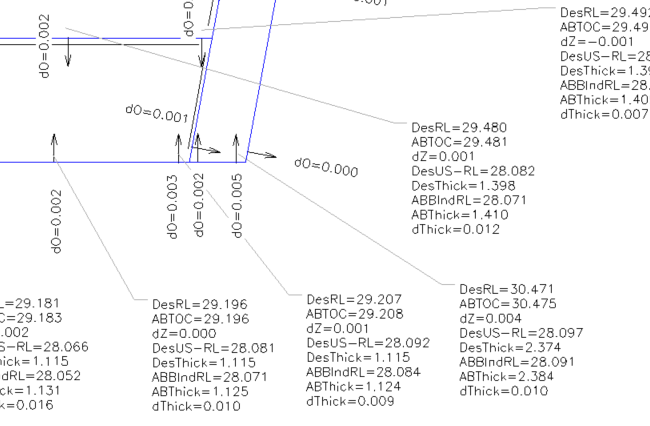
Or the combinations between bearing pad points, relative to an arbitrary 3D plane, there is no way to do this with labels.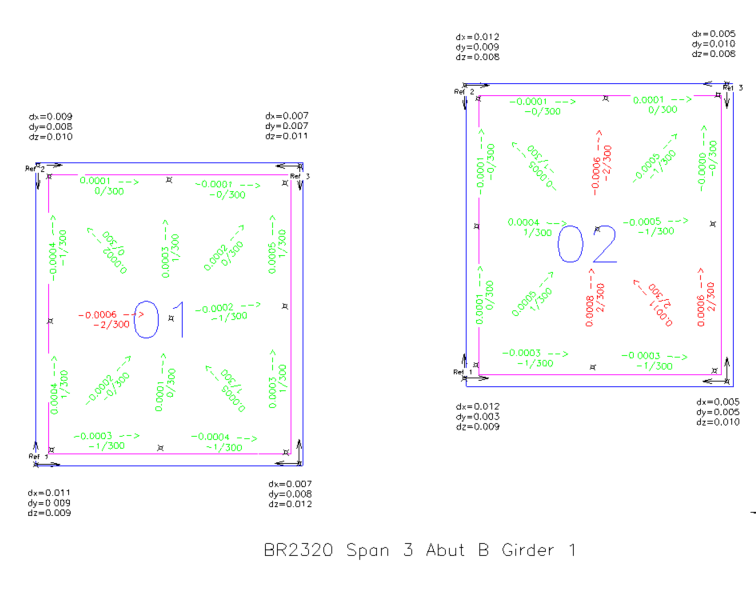
------------------------------
Ronny Schneider
------------------------------
Original Message:
Sent: 04-04-2023 20:55
From: Morteza Kiani
Subject: Simple question about the lableling
I believe I should go back and rename the topic since I posed the question on utilizing the PointLableEntity class and to @Ronny Schneider 's point, there's no way to use this class without instantiating a point feature.
Now, looking at MText, I believe it has plus that you don't have to create a point as an anchor. I haven't thought about that! Thanks!
------------------------------
Morteza Kiani
Original Message:
Sent: 04-04-2023 07:58
From: Gary Lantaff
Subject: Simple question about the lableling
Yes, the PointLabel object needs a point to label but you can just use MText with smart text to label a coordinate. Use either the text insertion location or a leader line to extract the coordinate.
------------------------------
Gary Lantaff
Original Message:
Sent: 04-03-2023 06:57
From: Morteza Kiani
Subject: Simple question about the lableling
Understood! Thanks Ronny!
------------------------------
Morteza Kiani
Original Message:
Sent: 04-03-2023 00:03
From: Ronny Schneider
Subject: Simple question about the lableling
That won't be possible, that's not how the point labels work. From the F1-Help

You'll always need a worldview object that is connected to that label.
You don't necessarily have to use named points, a simple Foreigncad.Point should suffice.
from Trimble.Vce.ForeignCad import Point as CadPoint

                cadPoint = wv.Add(clr.GetClrType(CadPoint))
                cadPoint.Point0 = p
                cadPoint.Layer = self.layerpicker.SelectedSerialNumber
------------------------------
Ronny Schneider
Original Message:
Sent: 04-02-2023 22:48
From: Morteza Kiani
Subject: Simple question about the lableling
Thanks for the quick response!
I added a point per label as below:
newpoint=self.pointCollection.Add(clr.GetClrType(Point))newpoint.PointID="something"newpoint.AddCoordinate(NEECoordinate(x, y, z))
In that case I have to create a lot of points to role as anchors for the labels. What if I just to want to label a coordinate! Is there anyway of doing that without defining a point?
Thanks,
------------------------------
Morteza Kiani
Original Message:
Sent: 04-02-2023 14:03
From: Ronny Schneider
Subject: Simple question about the lableling
Haven't tested it but I'd assume that you need to set the PointSerial, since a Label is always attached to point. The Label-object will then probably inherit the points location.
------------------------------
Ronny Schneider