TBC Macros and Extensions

 View Only
Expand all | Collapse all

UI - UI Similar to the edit alignment controls

  • 1.  UI - UI Similar to the edit alignment controls

    Posted 03-05-2023 11:40

    Is it possible for us to create a UI similar to the edit linestring UI? 

    There are quite a few TMLS that would be better suited for a style similar to this.


    ------------------------------
    Patrick L'heureux
    ------------------------------


  • 2.  RE: UI - UI Similar to the edit alignment controls

    Posted 03-06-2023 13:38
      |   view attached

    Sure. Just use the cmdData property UIViewForm instead of UIForm in the Setup method. I have attached a simple macro that justs shows TBC help in a view.

    Biggest difference is command inherits from a Grid control instead of a StackPanel.


    ------------------------------
    Gary Lantaff
    ------------------------------

    Attachment(s)

    zip
    ViewTest.zip   830 B 1 version


  • 3.  RE: UI - UI Similar to the edit alignment controls

    Posted 03-06-2023 13:46

    Thanks!


    ------------------------------
    Patrick L'heureux
    ------------------------------


  • 4.  RE: UI - UI Similar to the edit alignment controls

    Posted 03-06-2023 16:16

    Hello Patrick,

    I had a quick look at it and if you haven't figured it out yourself yet, just change this lower case wpf to Wpf. Since that is what we usually use and you can copy and paste code from other XAMLS.

    Apart from that I haven't done much with it yet.


    ------------------------------
    Ronny Schneider
    ------------------------------


  • 5.  RE: UI - UI Similar to the edit alignment controls

    Posted 06-19-2025 04:24

    Is there a way to control the size of this? Ideally I would like to have this split the active view similar to the experience we get with the alignment editor? @Bryce Haire


    ------------------------------
    PATRICK L'HEUREUX
    ------------------------------


  • 6.  RE: UI - UI Similar to the edit alignment controls

    Posted 06-19-2025 07:11

    You can drop a GridSplitter element into the grid. This example works horizontally.

            <GridSplitter Grid.Row="0" Grid.Column="2" Grid.RowSpan="12" HorizontalAlignment="Center" VerticalAlignment="Stretch"
                          Background="LightGray" ShowsPreview="True" Width="2"
                          Margin="0,20"/>
    

    Here is the MS help link How to: Resize Columns with a GridSplitter - WPF | Microsoft Learn


    ------------------------------
    David Brubacher
    ------------------------------


  • 7.  RE: UI - UI Similar to the edit alignment controls

    Posted 06-19-2025 09:05

    See gary's post about "ViewTest.zip".
    After cmd creation, try to reposition the tab to a new horizontal group. Something like this

    TrimbleOffice.TheOffice.MainWindow.AppMdiManager.MoveToNewGroup(TrimbleOffice.TheOffice.MainWindow.AppMdiManager.ActiveTab, Infragistics.Win.UltraWinTabbedMdi.MdiTabGroupPosition.Last, Orientation.Horizontal)


    This is what it would look like if after executing above.
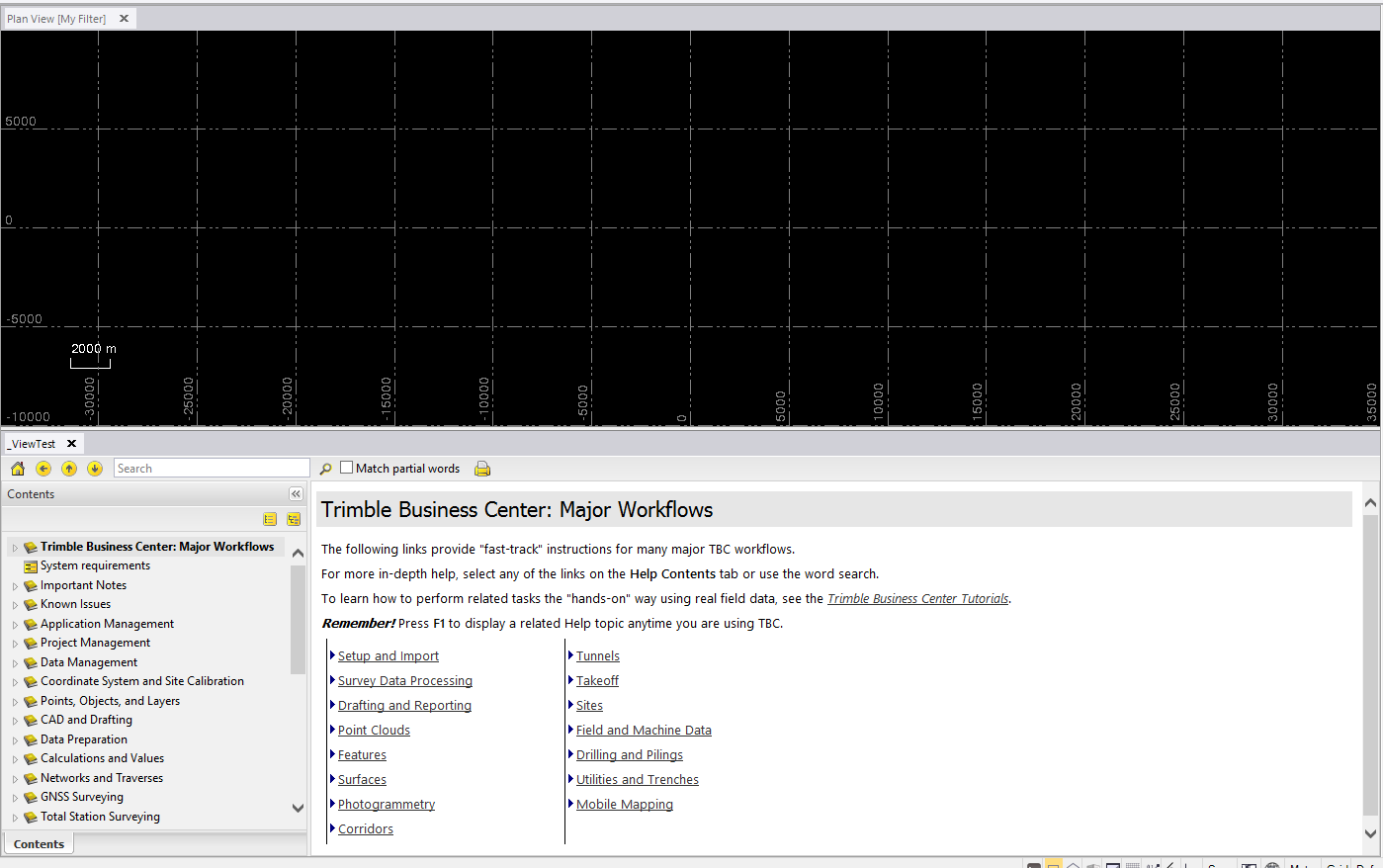
    Let me know if this helps any. 


    ------------------------------
    Bryce Haire
    ------------------------------


  • 8.  RE: UI - UI Similar to the edit alignment controls

    Posted 06-19-2025 10:27

    Works great. I have to clean up my code a bit but got a concept using your tip. Thanks!


    ------------------------------
    PATRICK L'HEUREUX
    ------------------------------