Trimble Business Center

 View Only

 Error in Importing GNSS data (T04) into the project in TBC (Version 2024.01)

Faramarz Nilfouroushan's profile image
Faramarz Nilfouroushan posted 09-19-2024 01:35

Hi,

I am running the TBC software, latest version 2024.01, made a project, but I can not import T04 files. I get this error:

"The type initializer for 'Trimble.Vce.Data.GNSSData.GNSSRawDataCheckIn' threw an exception."

Under Support, I have checked for updates, nothing there. Go to add, I have tried several GNSS data files and none of them worked. The files are OK, collected by R12i and I could import and process the data with previous versions of TBC.

Any suggestion please?

/Faramarz

Ronny Schneider's profile image
Ronny Schneider

Could you upload your file here?

I was able to import a T04 from a SPS785 into TBC2024.01 without error message.

I assume you did some static work on a tripod or with plumb pole and not some pickups with inclined pole? Converting the file to Rinex might be an option.

Faramarz Nilfouroushan's profile image
Faramarz Nilfouroushan

Thanks Ronny. Yes, the data was collected on static mode, R12i on the tripod, stationary. The attached file is one of the example files that I tried. I'm afraid,  I don't want to convert to Rinex, because this will be an extra work every time. BTW, I think, importing the rinex had also problem.

Do you have also 2024.01 version?

/Faramarz

Ronny Schneider's profile image
Ronny Schneider

Yes, I've installed it yesterday. But I didn't install the full installer. I had downloaded the 100 MB patch file.

For some reason it still says I'm on 2024.00 when I go to check for updates and if I check under about it still says 2024.00 but the revision in brackets has changed. But that's nothing new. I can't remember a patch where they bothered to update the number under about.

What numbers have you got there?

You opened this thread as question which prevents you from attaching files. Can you send me the file to my mail address r.schneider.eu@gmail.com.

Faramarz Nilfouroushan's profile image
Faramarz Nilfouroushan

OK, I just sent you an email and attached the files. I think, the version 2024.00 is OK and no problem with the importing; perhaps the problem is only with the new version. Please try the T04 files which I sent you.

Thanks!

Ronny Schneider's profile image
Ronny Schneider

Due to the inadequate customer information and release notes it turns out that there are 3 different 2024 versions.

Your data imports on my computer into all three without error message. I did use a new empty metric file for it. So, I'd suggest you try the same on your system.

If it does work with an empty project we could further investigate into the project, coordinate system settings.

If it still fails, you'll probably have to re-install TBC and potentially use the cleanup tool for doing so. (nearly at the end of this page https://community.trimble.com/viewdocument/trimble-business-center-utilities?CommunityKey=d961b046-1661-40f3-8d7e-0bde6866a14d&tab=librarydocuments)

As reference regards the 3 different TBC versions

2024.00

2024.00??? - Patch 1 - 100 MB installer

2024.01 or 2024.1 ??? who knows - full installer - confusing naming convention - check for update calls it 2024.1, installer is called "TBC_2024_01_Full_Setup.zip", below two different names as well

Faramarz Nilfouroushan's profile image
Faramarz Nilfouroushan

Hi,

Thank you Ronny. It is strange, it doesn't work for me. I have 2024.01 version, and the numbers you asked are: 2024.1.8991.38047.  As you suggested, I made a clean project, changed the coordinate systems, set units as GPS time (sometimes local makes problem), run clean utility, reinstalled TBC, but again, the same import problem. Any further suggestions?

/Faramarz


Ronny Schneider's profile image
Ronny Schneider

Unfortunate, that's gonna make it difficult to narrow it down.

In such cases I utilize Microsoft Process Explorer for trying to reverse engineer what TBC is doing, which files are being accessed etc..

Now we have to see if there is anything out of the ordinary that makes TBC stumble

Is this a new computer, or the same where you say that previous versions did successfully import T-files?

(I always keep older TBC versions since there is pretty much always something wrong with a newer version - see post 4 here Trimble Business Center 2024 truncating feature codes | Trimble Business Center)

Can you send me the project file with which it fails.

When do you get the error message, immediately after dropping the T-file, or do you see some activity/progress bar before it returns the error?

What country settings are you using?

Any special characters in any of the files/folders? Including your C:\Users\ folder, TBC is writing things to the AppData folder. There had been issues with Scandinavian characters before and since your data is located in Sweden that could be a possibility.

Where is your project saved? - folder name

Where is a new project created before you save it someplace else? - the project management folder
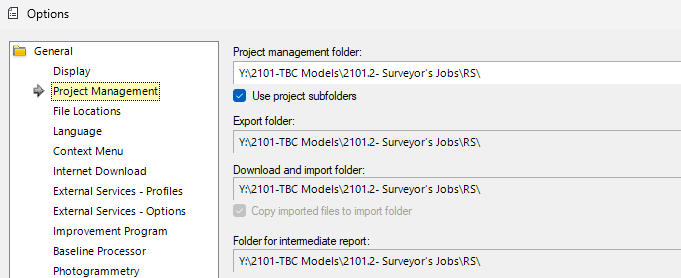
What coordinate system settings do you use?

In "C:\ProgramData\Trimble\GeoData", do you see a subfolder "G"? It should not be there, that was an error with some older installations. The cleanup utility should have taken care of it as well.

Any out of the ordinary files or folder names directly on your C-Drive? There had been an issue for example with exports for machine control when a mouse software had created a file "program." in "C:\".