Trimble Business Center

 View Only

 Failed to Publish Design to Project Library

Jump to  Best Answer
Tysen Ellison's profile image
Tysen Ellison posted 07-29-2022 08:50
I keep getting the following error when trying to publish a design for Earthworks to the project folder.  Here is a screenshot of what I'm seeing.
Screenshot of error


This is happening to all my projects since updated to 5.70.1

It will create the project, control, etc. just fine.  But will not publish any new design I create.  

Looking for some help if anyone knows a fix.  I have tried the copy and paste of the "antenna32.dll" from earlier posts with no success.

Thanks in advance!

Tysen

Eric Condemilicor's profile image
Eric Condemilicor  Best Answer
Hi Tysen,
I got mine to work now.
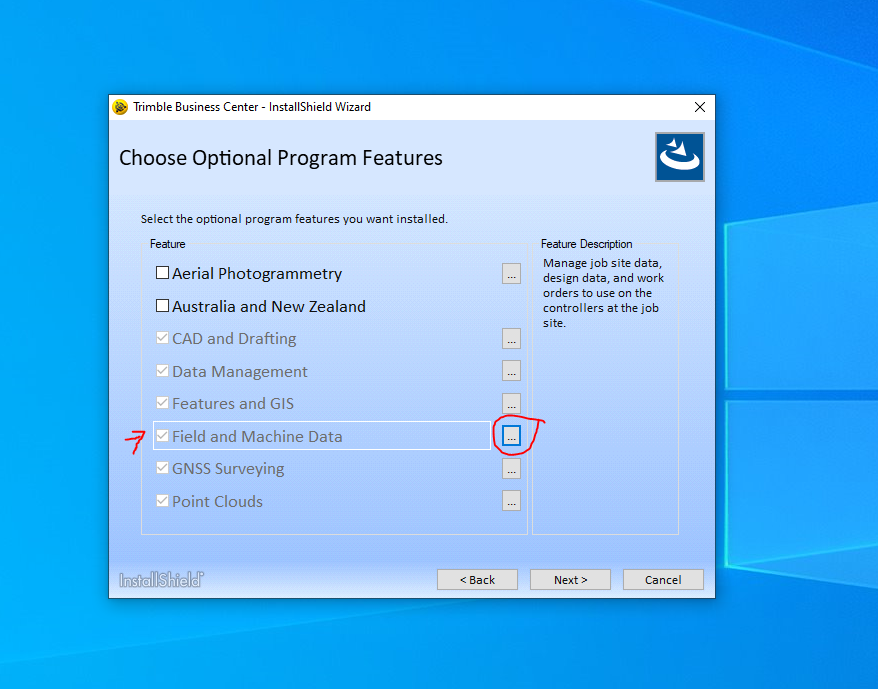
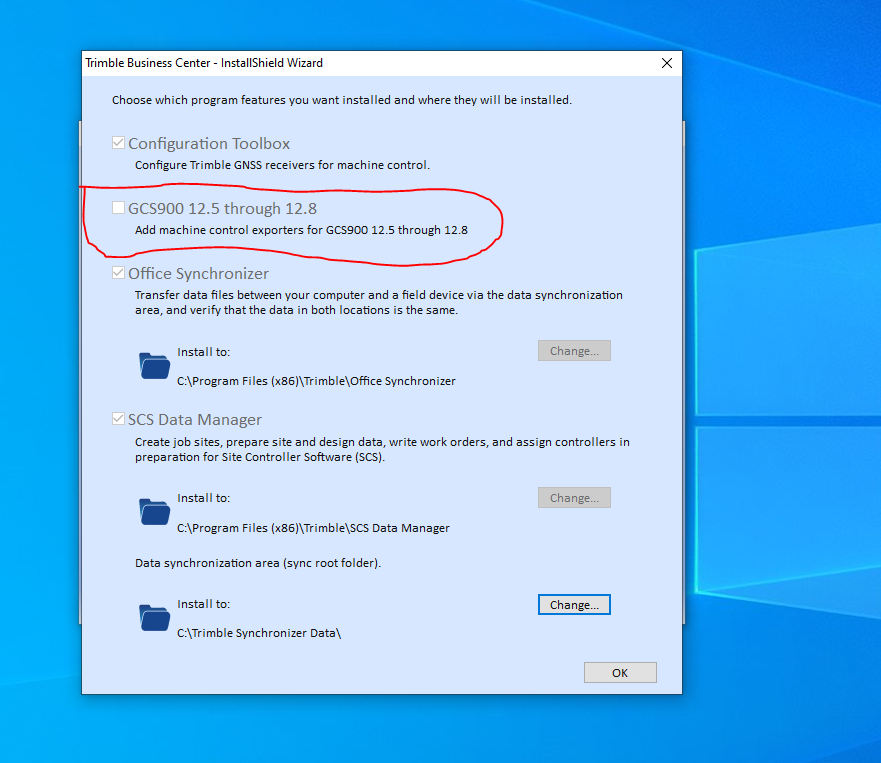
You have to uninstall the TBC 5.7 and when you reinstall, in the optional program, click the 3 dots next to "Field and Machine Data" then check the box "GCS900 12.5 through 12.8".
See screen shots below


Charlie Sorg's profile image
Charlie Sorg
I am not able to repeat it with my project data. Can you DM me your archived VCE?
Eric Condemilicor's profile image
Eric Condemilicor
I guess my comment got remove. All i said was I had the same issue. Let me know if anybody has the solution. I had to install file flipper to give the design out to the field.
Ronny Schneider's profile image
Ronny Schneider
[5.70] Unable to "Publish Field Data to Project Library" | Trimble Business Center

Have you got a GCS900 simulator on your system, if yes does that one work?

TBC will test the model SVD/SVL with a GCS900 simulator it has in a subfolder, even if you create for Earthworks. For Earthworks the SVD/SVL is then Zipped into a DSZ. If that simulator doesn't work, the model creation will fail. During a TBC install or upgrade the old Visual C++ 2008 redistributable can get scrambled. Try re-installing it and test again.

https://www.microsoft.com/en-us/download/details.aspx?id=26368

You can also check in the Windows Event Viewer if it might show what went wrong.
Anthony Dalla's profile image
Anthony Dalla
I had the same experience when I installed 5.70.1 on my machine.  Our Sitech rep recommended reinstalling Visual C++, as Ronny mentioned, and the problem was resolved.
Tysen Ellison's profile image
Tysen Ellison
I reinstalled the C++ 2008 and still have the issue.  Attached here is a .vcl of the job I'm having issues with.  

TE
Project that cant publish a design
Tysen Ellison's profile image
Tysen Ellison
Eric Condemilicor had the right answer.  Doing that process fixed my issue.  Thanks Eric!!

TE
Lizzy Jenkins's profile image
Lizzy Jenkins
I had this exact issue and tried the above re-install with no luck, tried re-installing CT utility with no luck, downloaded File Flipper-it works to convert files to the format I needed () but was just an extra step.

What DID work for me and was super simple-I browsed to this location on my PC C:\Program Files (x86)\Trimble\Configuration Toolbox\Bin and noticed ther was no 
antenn32.dll' file so I copied it form one of my surveyors PC's who was able to publish designs to the project library and pasted it into the above location on my PC and BOOM it now works!

Hope this tip may help others-I browsed the community (and google) so many times trying to sort this issue out so sharing here in case someone else has this same issue and this might work for them.