Trimble Business Center

 View Only

 graphics problem

deeb agbaria's profile image
deeb agbaria posted 01-20-2024 07:28

Hi everyone,

I have a dell precision 3660 workstation with nvidia geoforce rtx 4090 graphic card on it, and I'm facing a problem while working with pointcloud projects on the TBC.

It should be the best graphic card.

Is there anyone that can help me solve this issues.

Ronny Schneider's profile image
Ronny Schneider

What specifically is your problem? Software crashing, or too slow, or graphic glitches?

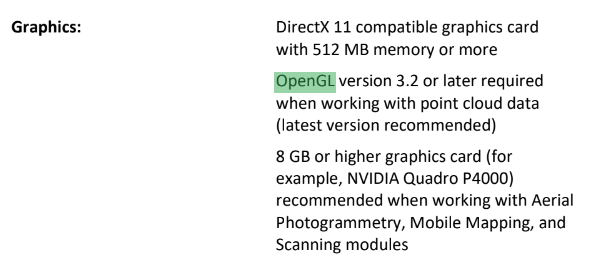
Have you set TBC to use OpenGL?

Is TBC actually using the Nvidia GPU?

See posts 2 and 8 here TBC 5.81 freezes constantly | Trimble Business Center


deeb agbaria's profile image
deeb agbaria

Hi Ronny,

Yes it's using the Nvidia graphic card, but it is too slow spicially in 3D view while I'm rotating the pointcloud.

The TBC is set on DirectX11, should i change it to OpenGL?

Ronny Schneider's profile image
Ronny Schneider

Yes, change it to OpenGL and restart TBC.

Trimble themselves suggest/request in all Release Notes, so far, that you do so.
And while you're in the options set the cloud cache to half your machines memory.
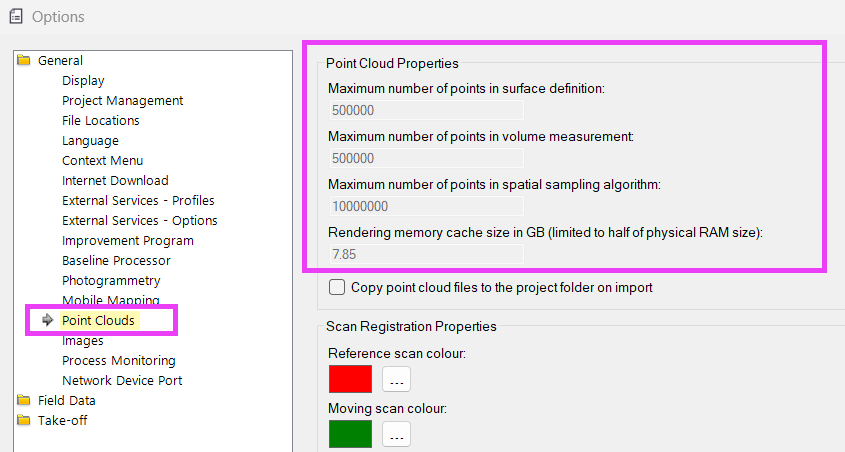
How much RAM does your machine have? For point clouds I would recommend 32GB and upwards.

Also, make sure your TBC project is stored on your local hard drive, at least as long as you work on it.