In response to the 2nd suggestion, I have all the Trimble DLLs in my object browser custom component set, and I can't find anything called CoordinateUtilities or ConvertCoordinateGridInUnderlyingSystem. I also tried your first suggestion and only got null back, but maybe I needed a coordinate collection with a point in it.
Anyway, I made it work thanks to the first line in the second suggestion.
            if (coordinateSystem.CSD is SiteCalibration site)
            {
                // create a coordinate data object to hold the lat/long site location
                var localPoint = new CoordinateData(CoordSystem.eLocal)
                {
                    Height1 = site.LocationHeight,
                    // this seems wierd but it works
                    Planar1 = site.LocationLatitude,
                    Planar2 = site.LocationLongitude
                };
                localPoint.CreateCoordinate();
                //
                var gridPoint = localPoint.Transform(site.ITransformer, CoordSystem.eGrid);
                job.Append("|ScalePointNorth|");
                job.Append(gridPoint.Planar1.ToString("F5", CultureInfo.InvariantCulture));
                job.Append("|ScalePointEast|");
                job.Append(gridPoint.Planar2.ToString("F5", CultureInfo.InvariantCulture));
                job.Append("|ScalePointElevation|");
                job.Append(gridPoint.Elevation.ToString("F5", CultureInfo.InvariantCulture));
                job.Append("|CombinedScaleFactor|");
                job.Append(site.GroundCoordinatesScaleFactor);
            }
I started with a CoordinateData object in the from system, populated the properties (I guessed at Planar1 and Planar2 because I sure didn't give it Planar values!), created the object internally and then transformed it using the ITransformer from the SiteCalibration CSD.
Is this best practices? no idea, but I have what I need.
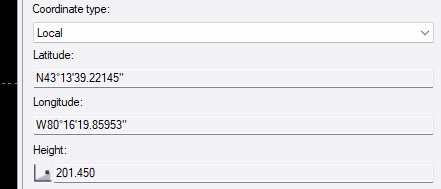
A test project with the local project location
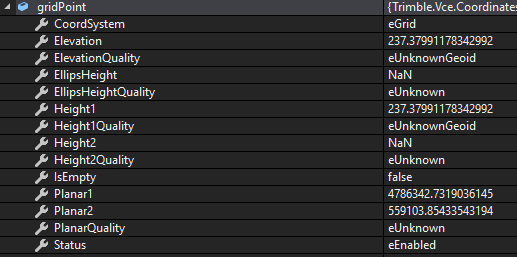
Same project but in Grid

Properties of gridPoint after transformation
Thanks again for the good clues Bryce.